



What is Parental Control Antivirus Software?
Parental control antivirus software is an all-in-one security program that protects devices from computer viruses while managing kids’ digital activities. It blocks malware, secures financial transactions, filters inappropriate websites, and lets parents schedule healthy screen time boundaries across family computers and phones.
Key Takeaways
-
SiyanoAV offers robust parental control antivirus software with real-time threat defense.
-
Dedicated safe browsing isolates online banking and UPI payments from malware attempts.
-
Category-based web filters keep kids away from adult sites and online risks.
-
Central management lets you balance study hours and entertainment across devices.
-
Available across India with localized technical support for homes, schools, and offices.
Complete Internet Security with Parental Control for Modern Families
Every connected home needs strong defenses. Families use laptops and phones for online classes, remote office work, and quick utility payments. Without proper management, one wrong click can download harmful spyware or expose kids to inappropriate content. Installing specialized parental control antivirus software ensures your entire home stays protected against cyber threats.
SiyanoAV Total Security delivers unified security. You do not need separate applications for malware cleanup, web filtering, or transaction safety. Our solution runs silently behind the scenes to secure your entire home network.
Safe Browsing Software India: Stopping UPI Fraud and Banking Scams
Digital payments make everyday purchasing fast, but fake payment links and rogue web portals risk your hard-earned funds. SiyanoAV creates an isolated browser sandbox whenever you open your banking portal or complete a UPI transfer.
This hardened environment blocks unauthorized screen captures, disables rogue keyboard loggers, and double-checks SSL certificates before you enter login details.
[CTA Button: Protect Your Bank Details Now]
Family Internet Safety: Real-Time Content Filtering and Screen Limits
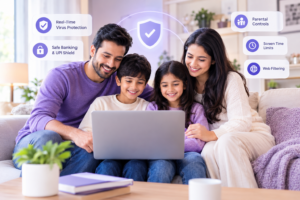
Children spend hours researching school assignments, streaming videos, and playing web games. Choosing an effective parental control antivirus software keeps your children safe from inappropriate content while they explore the internet.
Our content filtering engine categorizes web addresses instantly to restrict adult material, violent media, and unverified chat rooms. You can set automatic device lockout times during homework hours or bedtime. This gives parents complete control over daily computer usage without constant monitoring.
SiyanoAV Total Security Software for Family Protection
SiyanoAV Total Security is an integrated parental control antivirus software package built for modern digital households and institutions across India. It merges real-time malware protection, ransomware protection, and transactional shielding with configurable parental controls. Users can manage web content filtering, application permissions, and daily screen time limits from a single control panel. By combining financial fraud detection with child online safety, SiyanoAV reduces system overhead while protecting personal data and banking credentials across all home connected devices.
How to Protect Kids and Bank Details with One Antivirus
Managing digital safety should not require multiple subscriptions or complicated configurations. SiyanoAV makes full protection simple in four steps:
-
Install SiyanoAV: Download the setup program on your desktop, laptop, or mobile unit.
-
Activate Safe Banking: Enable auto-detection for payment pages to block phishing attempts and data theft.
-
Configure Child Profiles: Select age categories to block adult content and unwanted websites automatically.
-
Set Time Limits: Establish daily time allotments for games and web browsing to encourage screen balance.
[CTA Button: Download Free 14-Day Trial]
Why Upgrade to Parental Control Antivirus Software?
Standard security programs only detect traditional malware, leaving your financial transactions and children’s browsing habits unmonitored. By switching to comprehensive parental control antivirus software, you get multi-layered defense that guards your bank account while enforcing safe digital habits for your family.
Frequently Asked Questions
Q: Does total security protect online banking?
A: Yes. Total security suites include isolated browsing sandboxes that scramble keystrokes, verify website authentication, and block background data theft while you enter credit card or UPI details on banking portals.
Q: What is the best antivirus with parental control in India?
A: SiyanoAV Total Security is an effective choice for Indian users. It combines fast malware detection with localized web filtering, safe banking controls for regional payment methods, and accessible Indian technical support.
Q: Can antivirus stop UPI fraud?
A: Antivirus software prevents UPI fraud by blocking fake payment gateways, stopping clipboard interception, and alerting you if a link attempts to redirect your payment request to an unverified third party.
Q: Why do families need parental control software?
A: Families require parental controls to shield children from adult content, control daily device usage, block unsafe downloads on shared computers, and maintain healthy habits between study and screen time.
Q: Does parental control software track computer location?
A: Many multi-device suites include location features for mobile devices, allowing parents to review device locations alongside digital safety configurations.
Feature Comparison
| Security Feature | Basic Antivirus | SiyanoAV Internet Security | SiyanoAV Total Security |
| Real-Time Virus Scan | Yes | Yes | Yes |
| Safe Banking & UPI Shield | No | Yes | Yes |
| Parental Content Filtering | No | No | Yes |
| Screen Time Limits | No | No | Yes |
| Ransomware Defense | Limited | Yes | Yes |
FAQs
Q: What is parental control antivirus software?
A: Parental control antivirus software is security software that combines traditional anti-malware protection with administrative features like web filtering, application blocking, and screen usage schedules to protect kids online.
Q: Why do I need safe browsing software in India?
A: Safe browsing software protects users against localized phishing portals, fake UPI landing pages, and malicious adware campaigns designed to steal personal credentials.
Q: What is the best total security software for online banking and family protection in India?
A: SiyanoAV Total Security offers an ideal balance by combining bank-grade transaction sandboxing with comprehensive, customizable parental web controls and local customer support.
Q: Is total security software worth the extra cost over standard antivirus?
A: Yes. Total security provides additional features like financial transaction shields, parental controls, and webcam protection that basic antivirus packages lack.
Q: How do I download and activate SiyanoAV Total Security?
A: Purchase your plan on our official website, download the setup file from your account dashboard, and enter your 16-digit product key during installation.
Q: Where can computer resellers buy SiyanoAV bulk licenses?
A: Resellers and IT admins can register on our SiyanoAV Partner Portal to order multi-user licenses, renewal packs, and enterprise distribution keys at partner margins.
Q: Does SiyanoAV Total Security support multi-device home networks?
A: Yes. SiyanoAV offers flexible licensing options allowing you to cover multiple Windows PCs, laptops, and Android devices under a single account.
Q: What happens if my child tries to bypass the web filter or change the clock?
A: SiyanoAV locks administrative settings behind a master password. Attempts to alter system time or uninstall the application are automatically blocked without master credentials.
Conclusion: Get the Best Parental Control Antivirus Software
Protecting your home network requires proactive defense against payment scams and unsafe web content. SiyanoAV’s parental control antivirus software delivers total peace of mind by safeguarding your kids, securing your banking, and keeping all your family devices running smoothly.
3 Comments