

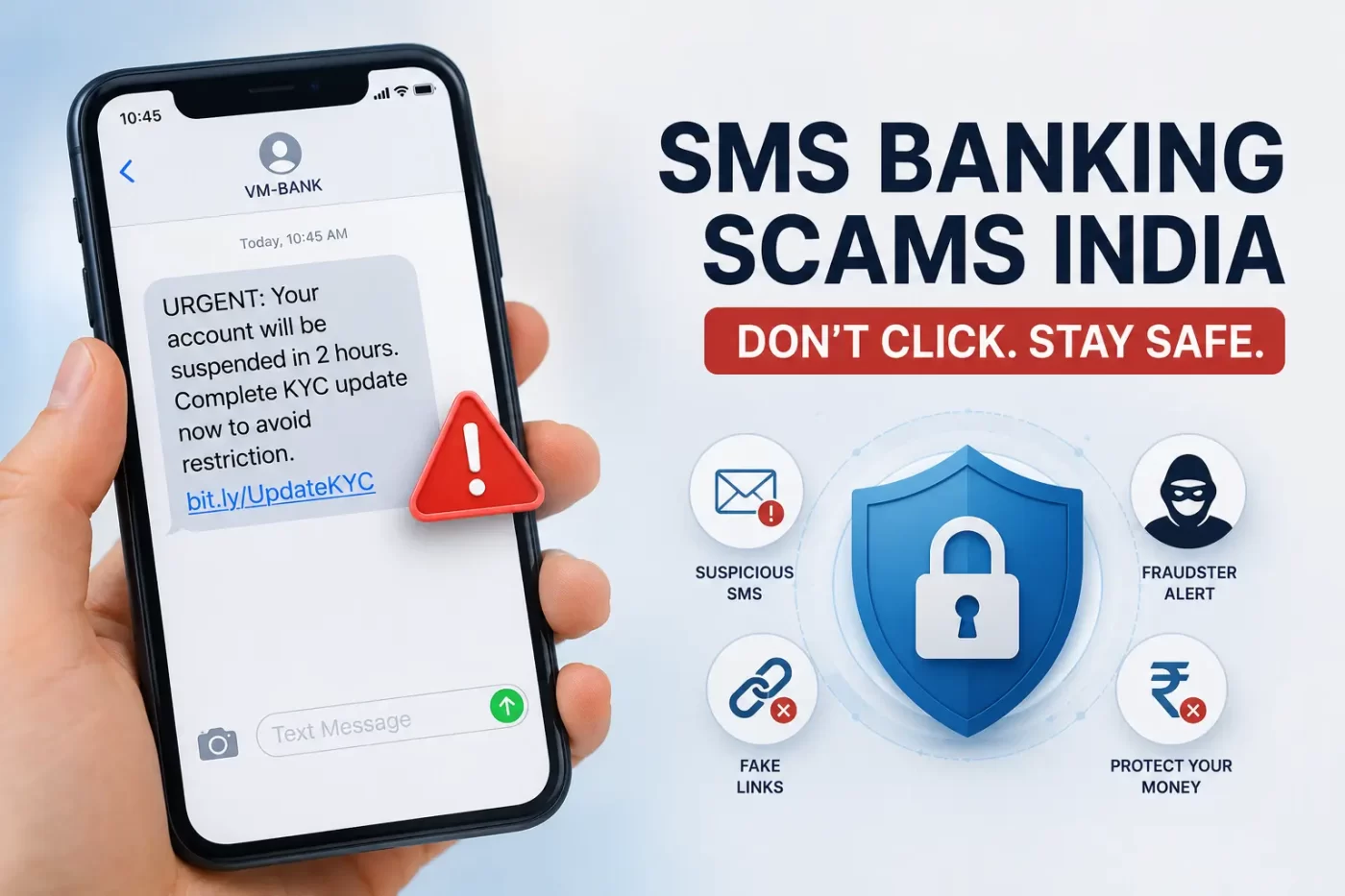

Your phone buzzes while you’re busy making coffee. You glance down. It looks like an urgent alert from your bank warning that your account will be suspended in two hours unless you complete a quick KYC update right now.
And right there, sitting at the bottom of the text, is a convenient little link.
If something like this has popped up on your screen recently, you aren’t the only one. The recent wave of SMS banking scams India is reaching frustrating levels, with reports pointing to a 146% jump in mobile-targeted financial fraud across the country.
Here’s the thing. Cybercriminals aren’t spending months trying to crack heavy-duty corporate servers anymore. Why take the hard route when they can simply nudge someone into tapping a link and typing out their credentials on a fake webpage?
Why Your Phone is Suddenly in the Crosshairs
Let’s be real for a moment. Most of us basically live on our phones. We pay for vegetables with a quick QR scan, check salary updates over lunch, and pay utility bills right before calling it a night.
Scammers understand this habit inside out.
They also realize that people naturally trust a text message far more than a random email sitting in a spam folder. That exact trust is driving the uptick in SMS fraud India 2026 tactics across cities and smaller towns alike.
When a message hits your phone during a chaotic morning commute, panic usually wins over logic. You see words like “ACCOUNT BLOCKED” and your thumb moves long before your brain has time to second-guess the message.
How SMS Banking Scams India Actually Work
In technical terms, people call this smishing—short for SMS-based phishing. But technical terms aside, the basic mechanics are straightforward and repetitive.
The scammer sends out thousands of text blasts that mimic official banking communications. They usually rely on three basic elements:
-
Manufactured Urgency: “Urgent: Complete action within 15 minutes.”
-
Emotional Hooks: “Your reward points are expiring today” or “Unrecognized transfer of ₹25,000 initiated.”
-
A Trap Link: A shortened web address designed to hide where it actually leads.
That’s where most people get caught off guard. They notice the message appears inside the exact same text thread as their legitimate bank alerts and assume it must be real.
It isn’t.
+-----------------------------------------------------------------------+
| TYPICAL MOBILE FRAUD PATHWAY                                          |
+-----------------------------------------------------------------------+
| Step 1: Fake SMS lands with an altered sender header                  |
| Step 2: Message creates panic about account suspension or lost funds  |
| Step 3: Victim taps link and enters net banking log-in details        |
| Step 4: Criminal steals OTP or installs silent background software    |
+-----------------------------------------------------------------------+
The Trick: Sender ID Spoofing and Fake Links
How does a fraudulent text end up grouped right next to genuine messages from your bank?
It comes down to sender ID spoofing. Scammers use specialized gateway tools to mask their real numbers with legitimate-looking header tags. Because default messaging apps group texts based on those header tags, the fake message neatly tucks itself into your existing conversation history.
Once you click the link inside that text, the scam usually goes down one of two paths:
-
Phishing Gateways: You are directed to a webpage that looks identical to your official bank login portal. The moment you enter your password and OTP, the attackers capture them and initiate transfers.
-
Hidden Malware: Tapping the link silently installs a Remote Access Trojan (RAT) or a fake utility app. Once installed, this app can read incoming OTP texts right off your display without prompting you.
This simple setup explains why smishing attacks India have turned into such a widespread problem.
What to Do If You Clicked a Suspect Link
If you realized a second too late that you tapped a sketchy link, try not to panic. Taking fast action can prevent actual financial loss:
-
Turn off connectivity: Switch to Airplane Mode immediately. Stopping cellular data and Wi-Fi breaks the communication line between your device and the attacker’s server.
-
Contact your bank: Reach out using the customer care number printed on the back of your physical card—never use numbers provided inside the suspicious text.
-
Report the incident: File a quick report on the official national portal at Cybercrime.gov.in or call 1930 to report financial fraud so funds can be blocked.
-
Run a security sweep: Use a reputable mobile security app to scan for unauthorized files, or perform a complete factory reset if an unknown
.apkwas downloaded.
Practical Steps to Secure Your Smartphone
Protecting yourself against a mobile banking scam India effort doesn’t require deep technical knowledge. It mostly comes down to building a few protective habits.
Keep in Mind: No legitimate bank operating in India will ever text you a random link demanding immediate PAN updates, KYC verifications, or password resets.
Here are a few quick habits that actually work:
-
Skip the links: Never tap web links embedded in unexpected text messages. Open your banking app directly or type the bank’s address directly into your browser.
-
Turn on native spam filters: Both Android and iOS include built-in spam detection features for messaging. Make sure they are toggled on in your app settings.
-
Double-check sender details: Inspect header names carefully. Authentic banking headers follow precise, standardized naming patterns, while scam accounts often add subtle typos or extra numbers.
-
Keep your OTPs private: An OTP is meant solely for transactions you personally initiated moments ago. Never share it over a call or type it into a web form opened from a text message.
-
Update your OS regularly: System updates regularly patch security holes that malicious apps rely on to compromise phone permissions.
You can also read up on official safety alerts directly on the Reserve Bank of India (RBI) website to stay informed on current banking regulations.
Frequently Asked Questions
What is smishing and how does it operate?
Smishing refers to phishing attacks executed through SMS messages. Fraudsters send fake texts masquerading as financial institutions or delivery companies to trick people into revealing sensitive details or clicking malicious links.
How can I tell if a bank message is fake?
Look out for generic greetings, threats of immediate account locking, strange web addresses (such as shortened links), and demands for personal credentials like your PIN, password, or OTP.
Can someone steal money just because I read a text message?
No, simply opening or reading an SMS will not give anyone access to your bank account. The risk occurs when you click embedded links, enter credentials on rogue websites, or download unauthorized files.
What immediate action should I take after clicking a scam link?
Disconnect your phone from the internet right away, contact your bank using their official hotline to block your cards, file a complaint on the 1930 cybercrime helpline, and run an antivirus scan on your device.
Final Thoughts
The current spike in SMS banking scams India is an annoying reality of modern digital conveniences. The tricks used by cybercriminals will keep evolving, but they almost always depend on making you react in a rush before you have time to think.
Whenever a text message demands quick action involving your money, slow down. Verify the message through official channels first, rely on trusted safety habits, and don’t let an unexpected 160-character text compromise your account.




Leave a Comment